Upgrading to Drupal 10.5 and 11.2: Navigating the CKEditor 5 v45 Landscape
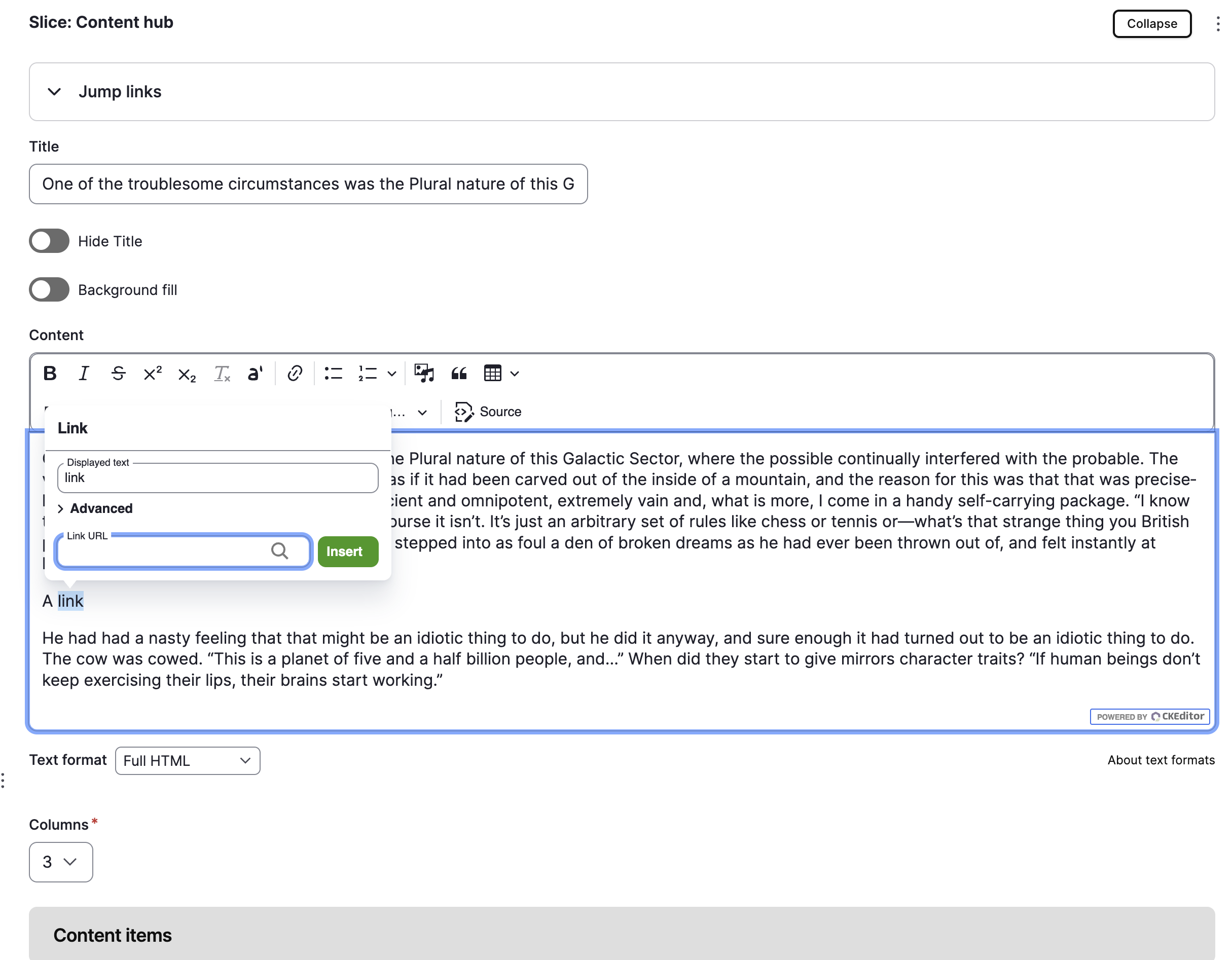
Drupal 10.5.0 and 11.2.0 bring a significant upgrade to CKEditor 5, moving from v44.0.0 to v45.2.0. This isn’t just a minor version bump - CKEditor 5 v45 introduces substantial improvements to the editor’s architecture and user experience. But it also includes breaking changes that ripple through the ecosystem of contributed modules that extend CKEditor.
If you’re planning to upgrade to either of these Drupal versions, understanding these changes and their impact on your site is essential.
What’s Better in CKEditor 5 v45
The upgrade brings real improvements to the editor experience:
- Refined link UI - The link dialog has been completely redesigned, making it more intuitive and consistent with CKEditor’s modern interface
- Icon system overhaul - Icons have been centralised into a dedicated package (@ckeditor/ckeditor5-icons) and renamed for consistency across the ecosystem
- Enhanced table handling - Tables now receive the
tableclass by default, enabling better styling integration with CSS frameworks like Bootstrap - Improved architecture - The underlying command structure is cleaner, with better separation of concerns
These improvements position CKEditor as a more mature, modern editor for content creation. But they come at a cost for modules that hook into the old interfaces.
The Challenge for Module Maintainers
Here’s where it gets complex. CKEditor 5 v45 introduced several breaking changes that required updates to contributed modules:
Icon name changes - All icons were renamed and moved to a new package. Modules that referenced icons by their old names (like icons.pencil or icons.cog) needed updates. Drupal added a backward-compatibility layer with deprecation warnings for 11.x, but modules still needed adjusting.
Link dialog restructuring - The link feature was significantly overhauled. Modules extending the link dialog had to account for:
- A new
displayedTextargument on link command execution - Removal of
ck-button-saveandck-button-cancelCSS classes - Restructured form views and button handling
Table class additions - The unconditional addition of the table class to all <table> elements affected modules that depend on CSS styling based on the presence or absence of that class.
For module maintainers, this meant real work to ensure their modules stayed compatible. But the good news is that the community moved quickly. Within weeks, most affected modules had updates released.
Impact on Site Builders
If you’re running a site with contributed CKEditor modules, you need to know which ones require updates before you can upgrade to Drupal 10.5 or 11.2. Here are the modules reported as affected:
Now updated and compatible:
-
Linkit (7.0.5+) - A powerful module for creating intelligent links with autocomplete suggestions. Essential for content editors needing smart internal linking. Decorator and link attribute logic updated for CKEditor 45 compatibility.
-
Editor Advanced Link (2.3.0+ for CKEditor 45, 2.2.7 for older versions) - Extends the link dialog with advanced options like target, title attributes, and custom CSS classes. Invaluable for sites needing more control over link behaviour. Fixed view restructuring and button class removal.
-
CKEditor Abbreviation - Allows content editors to add abbreviation markup, improving accessibility and semantic HTML. Compatibility fix released.
-
Anchor Link - Provides anchor link creation within CKEditor, useful for creating table of contents and in-page navigation. Icon updates and library support added.
-
CKEditor iFrame - Enables iframe embedding directly within CKEditor, helpful for embedding external content. CKEditor 5 45.2.0 support added.
-
CKEditor Media Resize - Allows editors to resize embedded media within the editor. Improves the editing experience when working with images and videos. Compatibility fix for CKEditor 45.x.
-
Editor File - Provides file browser integration in CKEditor for better file management. Updated to replace
.once()usage for Drupal 10.5 compatibility. -
CKEditor Responsive Table - Adds responsive table functionality to CKEditor, important for mobile-friendly content. Compatibility fix for CKEditor 45 changes.
-
Footnotes - Allows editors to add footnotes to content, essential for academic and reference sites. Compatibility updates being developed for CKEditor 5 45 support.
Still in progress:
-
Embedded Content - Allows embedding of various content types within the editor. Icon rename compatibility being addressed.
-
IMCE - A comprehensive file browser that integrates with CKEditor for media management. Critical for content-heavy sites. Browse-files button visibility issue with new Insert/Update button.
-
CKEditor Link Styles - Provides predefined link style classes for consistent link styling across content. CKEditor 45+ compatibility work ongoing.
-
Entity Embed - Embeds entities (nodes, media, etc.) directly in rich text fields, creating dynamic, reusable content. Widely used for complex content layouts. Widget toolbar icon issues still being reviewed.
Upgrade Strategy for Site Builders
If you’re using any CKEditor-extending modules, here’s a practical approach:
Before upgrading Drupal:
- Audit your CKEditor configuration - Document which CKEditor modules you’re using
- Check module compatibility - Visit each module’s issue queue (linked in the resources section) to see if updates are available
- Test on staging - If updates are available, test them on a staging environment first
- Plan your upgrade window - Some modules may still be in development, so timing matters
If your site uses a module still in progress:
- Follow the issue thread on drupal.org - module maintainers are actively working on fixes
- Consider temporarily disabling features that depend on CKEditor until the fix is available
- Don’t let one module block your upgrade if it’s non-critical
After upgrading:
- Clear all CKEditor caches and browser caches
- Test all editor functionality thoroughly
- Check for console errors related to CKEditor icons or link dialogs
- Verify that any custom CSS rules for tables (especially if using Bootstrap) still work as expected
Themes and Bootstrap-Based Sites
If your site uses Bootstrap or custom CSS rules that target elements by the presence or absence of the table class, you may need to review your CSS. The addition of the table class to all tables by default is good for styling consistency, but it means CSS that relied on tables not having that class will need adjustment.
This is typically a minor CSS update, but it’s worth checking during your upgrade.
A Sign of a Healthy Ecosystem
The fact that so many modules were quickly updated is actually a positive sign. It shows that the Drupal community responds rapidly to these kinds of changes. Module maintainers understood the impact and got updates out quickly.
Yes, there’s work involved. Yes, you need to plan for updates. But this is how open-source software evolves - with breaking changes that improve the architecture, followed by the community rallying to support those changes.
Key Takeaways
- CKEditor 5 v45 is worth upgrading to - The improvements justify the work
- Most affected modules already have fixes - Check the module pages for the latest releases
- Plan your upgrade - Audit which CKEditor modules you use and verify they’re compatible
- Test thoroughly - CKEditor changes can be subtle, so test editor functionality after upgrading
- Expect ongoing support - A few modules are still being updated, but the work is happening
If you’re upgrading to Drupal 10.5 or 11.2, take the time to plan your CKEditor ecosystem. The upgrade is worth it, and the community is here to support the transition.
Resources: